Introduction
Just to make everything easier, we follow a set of conventions when it comes to cad. This ensures everything is better organized and useable among different members of the team involved in CAD.
Naming
Part files must be named using camelCase.
Give parts short, descriptive names, and NOT amongUsIdkWhatThisPartDoes
Generally, name a part by its actual name, which is the name listed on the manufacturer’s website. The name may have part numbers and other similar things in the name: only include what’s actually relevant in the name. If a 2” measurement in the name listed on the manufacturer’s website is actually relevant, include that in name you put in Fusion. For example: ‘compliantWheel4In’.
If you design your own part, then name it by what it does.
Component hierarchies
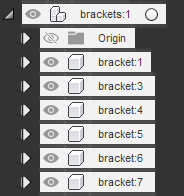
If there is a situation where you have multiple (2+) of the same component, or with slight variations (such as left/right versions of a part), place the components under a parent component whose name is the plural of an individual’s.
For example, a component hierarchy of brackets should look like this:
General robot parts
General robot parts is a folder we created that exists in the FRC Team 3624 Fusion 360 Team. This folder contains commonly used parts in our CAD models. To avoid having to CAD or download models that we use a lot, it is much quicker to just import from this said folder. Please add models of any parts we use a lot in our CAD models into here, if they aren’t already here of course.